
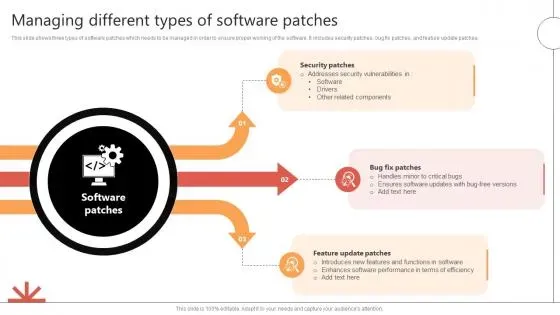
Software patches are more than quick fixes; they are the essential updates that keep systems secure, stable, and capable of supporting new features. They serve two roles: rectifying vulnerabilities and improving software quality, including security patches when relevant. In practice, timely and well-managed patches are a core part of cybersecurity hygiene and IT operations across enterprises of different sizes, safeguarding productivity and reducing unexpected downtime. This introductory post explains why patches matter and offers practical steps for effective patch management across an organization. By understanding software updates, vulnerability remediation, and the software patch lifecycle, teams can reduce risk while maintaining performance.
Think of this process as ongoing update management, where teams track, test, and deploy changes that strengthen defenses and improve reliability. Instead of waiting for crises, organizations rely on a structured patch program, standard change controls, and automated workflows to push fixes across diverse environments. The conversation shifts from patches to broader terms such as security updates, vulnerability remediation, and software patch lifecycle, all of which describe the same discipline from different angles. By embracing a holistic approach to software maintenance – covering discovery, assessment, testing, deployment, and verification – organizations can reduce risk, minimize downtime, and demonstrate due diligence to stakeholders.
Understanding Software Patches: What They Do and Why They Matter
Software patches are essential updates that fix vulnerabilities, improve performance, and close compatibility gaps in your applications. They are an ongoing part of the software patch lifecycle and a core component of patch management, ensuring systems stay aligned with current threats and needs.
Rather than optional add-ons, patches are a key element of cybersecurity hygiene. Prompt and effective patching reduces exposure to known flaws and accelerates vulnerability remediation, while also keeping software updates aligned with business priorities and user expectations.
Security Patches, Patch Management, and Timely Updates
Security patches are the frontline defense in modern IT. Attackers routinely target disclosed vulnerabilities, and delaying patches widens the attack surface. By deploying security patches quickly, organizations shrink the vulnerability window and improve overall risk posture through software updates and vulnerability remediation.
Effective patch management treats security patches as high priority across all assets, continuously tracking progress through the software patch lifecycle and validating impact through controlled testing.
Integrating Patch Management into Your Software Update Strategy
Integrating patch management into your software update strategy means establishing governance, SLAs, and clear ownership across teams. This alignment ensures that every asset receives the right patches at the right cadence, supported by automated vulnerability scanning and regular reporting.
A well-designed strategy includes a tested policy for deploying patches, phased rollout, and rollback plans to minimize disruption while maximizing security and stability.
Vulnerability Remediation Through an Effective Software Patch Lifecycle
Vulnerability remediation hinges on an efficient software patch lifecycle. By closing critical gaps promptly, teams reduce exploitation risk and prevent small issues from becoming outages.
Core lifecycle stages—inventory, vulnerability ranking, testing, deployment, verification, and monitoring—work together to shorten remediation times and demonstrate progress to executives and auditors.
Best Practices for Efficient Software Updates and Patch Deployment
Best practices for patching start with a clear policy, accurate asset inventories, and risk-based prioritization so the most dangerous vulnerabilities are addressed first.
Automation, thorough testing, and scheduled maintenance windows help balance security with business continuity, while documentation supports audits and continuous improvement.
Measuring Patch Success: Metrics for Security, Stability, and Compliance
Measuring patch success requires concrete metrics that reflect security, reliability, and compliance: time to patch, patch adoption rate, and percentage of systems in compliance windows.
Dashboards and reports translate patching activity into actionable insights, showing how patch management improves vulnerability remediation, reduces downtime, and aligns with organizational objectives.
Frequently Asked Questions
What are software patches and why are they essential in patch management?
Software patches are updates that fix bugs, close security gaps, and improve compatibility. They are a core part of patch management because timely software patches reduce risk from known vulnerabilities, improve stability, and help meet compliance requirements.
How do security patches differ from other software updates, and why should they be installed promptly?
Security patches specifically address exploitable vulnerabilities that threat actors can leverage. Other software updates may fix bugs or add features. Prompt installation of security patches reduces vulnerability remediation time and minimizes exposure, while routine software updates maintain overall health of systems.
What is the software patch lifecycle, and how does it support vulnerability remediation?
The software patch lifecycle is a repeatable process that includes discovery, risk assessment, testing, deployment, verification, and reporting. Following this lifecycle helps teams prioritize patches, validate compatibility, and accelerate vulnerability remediation while reducing downtime.
What are best practices for implementing patch management across an organization?
Adopt a clear patch management approach: maintain an up-to-date asset inventory, prioritize patches by risk, use automated scanning and deployment, test patches in a controlled environment, deploy in stages, and monitor results. These practices streamline software updates and strengthen security posture.
What common challenges do organizations face with software patches, and how can they be overcome?
Common challenges include downtime, compatibility issues, asset sprawl, and compliance demands. Overcome these by planning maintenance windows, conducting thorough testing, consolidating patch management tools, automating workflows, and maintaining auditable patch records for compliance.
Which metrics matter when measuring the success of patch management and software updates?
Key metrics include time to patch, patch adoption rate by system type, percentage of systems within compliance windows, the number of patches pending, and post-patch incident rates. Tracking these indicators demonstrates the effectiveness of patch management and vulnerability remediation efforts.
| Key Point | Description |
|---|---|
| What are patches? | A patch is a small code package that updates software to fix problems, improve performance, or close security gaps. Categories include security patches, bug fixes, feature patches, and compatibility patches. |
| Why patches matter | Security patches defend against known vulnerabilities; patches also improve reliability, compatibility, and regulatory compliance. Patch management reduces exposure windows and demonstrates due diligence to auditors and customers. |
| Patch types | Security patches (high-risk), Bug fixes, Feature patches (new capabilities), Compatibility patches (interoperability with other software/hardware). |
| Patch management lifecycle | Inventory and discovery; Vulnerability assessment and risk ranking; Testing and staging; Deployment and change management; Verification and monitoring; Reporting and continuous improvement. |
| Common challenges | Downtime and user impact; Compatibility issues; Asset sprawl; Testing costs; Compliance pressures. Addressed through planning, testing, and automation. |
| Best practices | Establish patch policy; maintain asset inventory; prioritize by risk; test thoroughly; automate patching; schedule maintenance windows; validate and audit patch status. |
| Practical steps | 1) Create asset/software catalog; 2) Define risk-based patch priorities; 3) Enable automated patch scanning; 4) Build a test lab; 5) Plan staged deployments with rollback; 6) Communicate timelines; 7) Monitor and report; 8) Iterate for improvement. |
| Role of technology | Patch management and vulnerability management tools orchestrate updates across on-premises, cloud, and mobile endpoints, automating scanning, deployment, and reporting; supports coordination of updates beyond just security patches. |
| Real-world scenarios | Examples include applying a security patch to web-facing services to close a vulnerability, or deploying a bug-fix patch to improve stability and reduce downtime, resulting in lower risk and better user experience. |
| Measuring success | Key metrics: time to patch, patch adoption rate, systems in compliance windows, patches pending, and post-patch incident rate. These metrics guide priorities and demonstrate value. |
Summary
End of table.